
AI-Powered Document Workflow Automation Solutions
Document workflow automation helps your team process documents faster, reduce manual errors, and avoid delays caused by paperwork. Wappnet.ai’s AI document workflow automation streamlines document collection, data extraction, validation, approvals, and routing, so your team can spend less time on repetitive tasks and more time serving customers and making informed decisions.

Why Businesses Invest in Document Workflow Automation
As document volumes grow, document processing automation helps businesses improve data accuracy, speed up approvals, and streamline automated document processing across contracts, invoices, forms, and applications.
Repetitive Manual Data Entry
Staff retype the same information from documents into multiple systems, which is slow and error-prone.
Documents Arrive in Different Formats
PDFs, scans, emails, and forms each need different handling before their information can be used.
Missing or Inconsistent Information
Incomplete fields or mismatched details require teams to track down the right person before work can continue.
Slow Approval Cycles
Documents sit in inboxes waiting for review, delaying approvals from hours to days.
Documents Routed to the Wrong Person
Without clear routing rules, documents reach the wrong people and delay progress.
Repeated Follow-Ups
Staff spend time chasing signatures, confirmations, and missing attachments instead of focusing on higher-value work.
Limited Visibility Into Document Status
Without a shared view of document status, teams struggle to update customers and colleagues on progress.
Errors That Require Rework
A single data entry mistake can trigger corrections across multiple systems and teams.
What Does Document Workflow Automation Include?
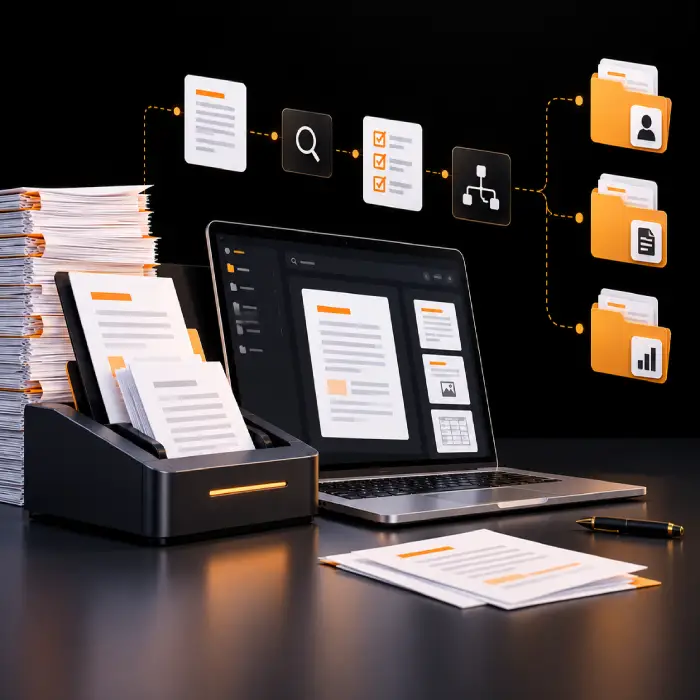
Document workflow automation coordinates every stage a document passes through, from intake and classification to extraction, validation, routing, and approval, and the system update it triggers downstream, which is different from relying on intelligent document processing alone, since reading and extracting data is only the first part of the job. Wappnet.ai designs both as complete document automation solutions: intelligent capture that understands the document, and a connected workflow that decides what happens next, who reviews it, and when the process is genuinely complete.
- Capture documents from email, upload portals, scanned files, and connected systems.
- Classify each document type and extract the relevant fields.
- Validate extracted data against your business rules and reference data.
- Route documents to the right reviewer or approver based on type, value, or exception.
- Update the connected system of record once a document is approved or completed.
Document Workflow Automation Solutions Built for Your Business
Our AI-powered document processing capabilities bring intake, extraction, validation, routing, and reporting into one coordinated workflow. Capabilities are configured to your document types and business rules, not switched on by default.
Multi-Format Document Intake
Accept documents by email, upload, scan, or system integration, so the workflow starts the same way regardless of how a document arrives.
Intelligent Document Classification
Automatically identify document type and structure, so the right extraction and validation rules apply from the start.
OCR & Data Extraction
Pull relevant fields from structured, semi-structured, and scanned documents, including handwritten or image-based files.
Field Validation & Business Rule Checks
Check extracted data against reference values, formatting rules, and your own business logic before it moves forward.
Document Routing & Approval Workflows
Direct each document to the right reviewer or approver automatically, based on type, value, or exception, as part of document approval workflow automation.
Missing Information Detection
Flag incomplete or inconsistent documents early, before they slow down a later approval step.
Exception Handling & Human Review
Route anything uncertain, high value, or out of policy to a person, with the relevant context attached.
Document Status Tracking
Give teams and customers a clear view of where a document stands, from intake through completion.
Audit Trails & Reporting
Keep a time-stamped record of who reviewed, approved, or changed a document, supporting document management workflow automation and compliance needs.
Integration With Business Systems
Connect document workflows to the ERP, CRM, accounting, or document management platforms your business already runs on, as part of document routing automation designed around your systems.
Still Spending More Time on Paperwork Than on Your Actual Work?
Tell us what's eating up your team's time, be it re-entering data, chasing approvals, or double-checking documents, and we'll help you see where automation could give that time back.
Works With the Systems You Already Use
Document workflows are most useful when they connect to the systems your team already relies on. Available integrations depend on supported APIs, permissions, and project scope, and are confirmed during discovery rather than assumed.
Our Document Workflow Automation Process
A structured path from a document arriving to a business process being complete, with human review built in at the points that matter rather than only at the end.
- 1
Document Intake & Capture
Documents arrive by email, upload, scan, or system integration and enter the workflow as a single, trackable record.
- 2
Classification & Document Understanding
The system identifies the document type, such as an invoice, contract, claim, or form, and understands its structure before extraction begins.
- 3
Data Extraction & Validation
Relevant fields go through document classification and data extraction, then are checked against reference data, formatting rules, and expected values.
- 4
Business Rule Checks & Exception Identification
Extracted data is tested against your business rules as part of automated document validation; anything incomplete, inconsistent, or out of policy is flagged as an exception.
- 5
Review, Approval & Workflow Routing
Clean documents move to the next approver automatically; flagged documents go to a person for review before continuing.
- 6
System Updates, Record Keeping & Completion
Once approved, the workflow updates the relevant system of record and keeps an auditable trail of what happened.
Document Workflow Automation: Use Cases
These are common starting points for business process document automation; actual scope depends on your document types, systems, and approval rules.
Contract Review & Approval
Contracts often wait in inboxes for the right reviewer, delaying deal and renewal timelines. A connected workflow routes each contract to the right reviewer based on type and value and keeps a record of approvals, so legal and business teams know exactly where a contract stands.
Employee Onboarding Documents
New-hire paperwork arrives from several sources and often needs manual chasing before a start date. Automation collects, checks, and routes onboarding documents to HR, payroll, and IT in parallel, so new employees aren't held up by missing forms.
Purchase Order Processing
Matching purchase orders, invoices, and receipts manually is slow and error-prone. A document workflow validates order details against expected records and routes exceptions to procurement, so clean orders move through without manual matching.
Insurance Claim Documentation
Claims arrive with inconsistent supporting documents, forcing adjusters to request missing information repeatedly. Automation checks submitted documents against required fields and flags gaps early, so adjusters review complete, organized claim files.
KYC & Compliance Document Handling
Verifying identity and compliance documents manually slows down onboarding and renewal cycles. A workflow checks document completeness and required fields, then routes anything uncertain or sensitive to a compliance reviewer rather than approving it automatically.
Supplier Document Management
Supplier certificates, contracts, and compliance documents expire or go missing without anyone noticing. Automated tracking flags expiring or incomplete supplier documents and routes renewal requests before they become a gap.
Customer Application Processing
Application forms with missing or inconsistent information create back-and-forth before an application can move forward. Automation validates submitted information against requirements and only routes complete applications to the next reviewer.
HR Forms & Internal Approvals
Routine HR forms, such as leave requests or expense documentation, often depend on manual routing between managers and HR. A connected workflow routes each form to the right approver and updates HR records once it's approved.
Document Workflow Automation vs. Manual and Basic OCR Processing
Manual processing and basic OCR tools can capture document information, but they often require additional effort to validate data, manage approvals, and update business systems. Document workflow automation connects these steps into a coordinated process with tracking, exception handling, and audit trails.
Industries We Help With Document Workflow Automation
Document-intensive industries each have their own document types, compliance requirements, and approval rules, so every deployment of document workflow automation is scoped to your industry rather than applied as a single template.
Banking & Financial Services
Loan documents, account opening forms, and credit files moving through structured review stages.
Insurance
Claims and policy documentation requiring consistent checks before an adjuster reviews a file.
Healthcare Administration
Patient intake and billing documents, with sensitive data handled separately from clinical decisions.
Manufacturing
Supplier certificates, quality documentation, and compliance paperwork routed for review.
Logistics & Supply Chain
Shipping, customs, and delivery documents matched against orders and schedules.
Retail & E-Commerce
Supplier agreements, purchase orders, and vendor compliance documents at scale.
Professional Services
Client engagement letters, contracts, and compliance records routed for sign-off.
HR & Enterprise Operations
Onboarding paperwork and internal approval forms routed between managers and HR.
Why Choose Wappnet AI for Document Workflow Automation?
As a document workflow automation company, we don't start from a fixed template. Before any workflow is designed, we review your document types, approval rules, systems, and where human judgment needs to stay in the loop, bringing that same discovery-first approach to our document workflow automation services and document workflow automation solutions, scoped around one goal: fewer manual handoffs and clearer visibility into where every document stands, without assuming every process needs the same level of automation.
- Business-first workflow design, not a one-size-fits-all script.
- Integration with the systems your team already uses, where supported.
- Appropriate use of AI for classification and extraction, paired with business rules for decisions.
- Human review built in wherever judgment, policy, or sensitive information is involved.
- Focus on measurable outcomes, agreed with your team before a workflow goes live.
- Ongoing monitoring and refinement as your document volume and processes evolve.
Real-World Document Workflow Automation Solutions We've Delivered
A look at how different teams have put AI document workflow automation to work inside their existing systems.
Multi-Format Invoice & Order Workflow
A distributor connected its accounts payable systems to extract invoice data, cross-check purchase orders, and route approvals without manual matching.
Contract Routing & Approval System
A professional services firm automated intake, metadata extraction, and multi-department approval routing for client engagement contracts.
Employee Onboarding Document Coordination
An enterprise HR team automated document collection, identity checks, and parallel system updates for new hires across global locations.
Ready to Simplify Your Document Workflows?
Reduce manual paperwork, speed up approvals, and improve document visibility with document workflow automation tailored to your business needs.
Latest AI Insights & Industry Trends
 RAG
RAG vs Fine-Tuning vs Prompt Engineering: Which Approach Fits Your Use Case?
Compare RAG, fine-tuning, and prompt engineering to explore costs, use cases, and the best approach for enterprise AI.
 AI Copilot
What is an AI Copilot? Use Cases & Build Guide
What is an AI Copilot? Learn how it works, how it differs from AI agents, key use cases, and how to build one for your business.
 RAG
What Is RAG? A Complete Guide to Retrieval-Augmented Generation
Learn what RAG is, how Retrieval-Augmented Generation works, reduces AI hallucinations, and powers smarter enterprise AI.
Frequently Asked Questions
Document workflow automation streamlines document intake, data extraction, validation, approvals, and routing, reducing manual work and helping business processes move faster.
AI document workflow automation identifies document types, extracts relevant data, checks business rules, and routes documents to the right people or systems. Incomplete or uncertain documents are flagged for human review.
Document processing focuses on reading documents and extracting data, while document workflow automation also manages validation, approvals, routing, and business system updates.
Depending on the configuration, document workflow automation can process PDFs, scanned images, Word documents, emails, and structured forms.
Yes. OCR can extract information from scanned and image-based documents. Accuracy depends on document quality and structure, with uncertain results flagged for review.
The system flags missing information, inconsistent data, and rule violations for human review before they affect downstream processes.
Yes. Workflows can include manual approvals for all documents or only for sensitive cases, exceptions, and decisions requiring human judgment.
Yes. Supported integrations can connect workflows with ERP, CRM, accounting, document management, and e-signature platforms, depending on API availability and compatibility.
Security measures can include role-based access, retention policies, and audit trails. Specific safeguards depend on your system configuration and deployment requirements.
Businesses can track document processing automation time, extraction accuracy, correction rates, approval turnaround time, exception rates, and processing costs to measure improvements.