
Document AI & Intelligent Document Processing Services
Your team didn't sign up to retype what's already printed on a form. Wappnet.ai's Document AI services turn scanned PDFs, photographed receipts, and multi-page contracts into structured, validated data your systems can actually use, combining OCR, document classification, and field extraction into a single intelligent document processing pipeline. Where a process needs more than extraction, such as approvals or system routing, we connect that same foundation into your broader document workflows.
What Do Document AI & Intelligent Document Processing Services Include?
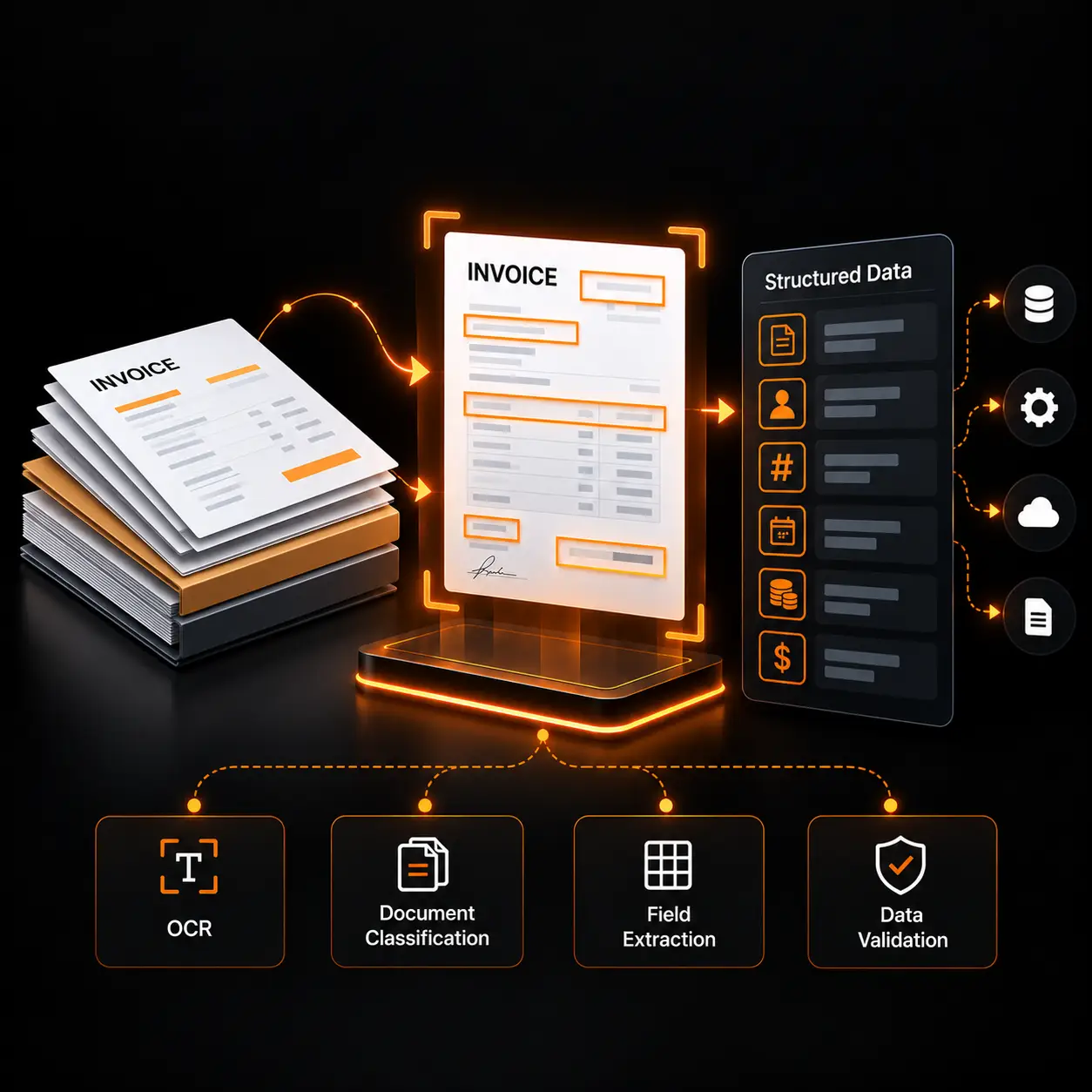
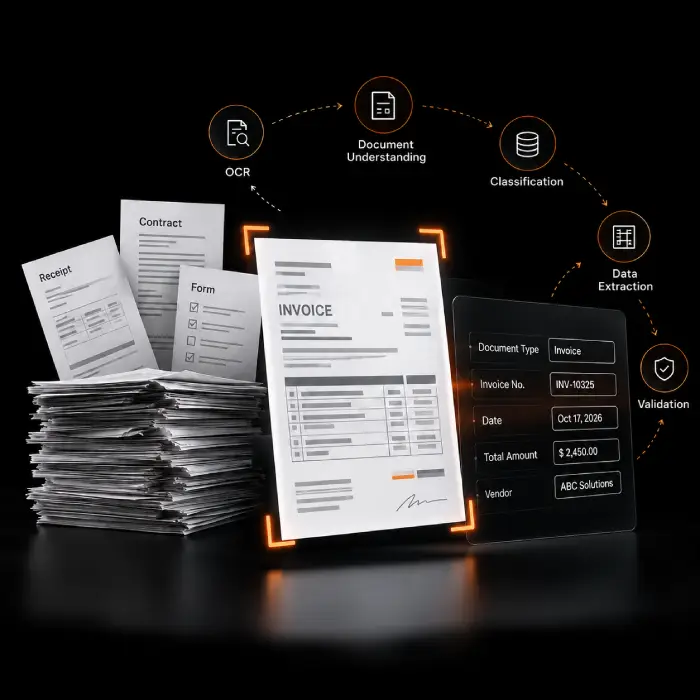
These terms get used loosely, and that’s part of why document automation projects stall. Optical Character Recognition (OCR) reads the text in a scanned document or image. Document understanding goes further, reading structure, fields, tables, and layout, not just words. Intelligent document processing (IDP) combines OCR, classification, extraction, and validation into one pipeline, the core of what most buyers mean by document understanding AI. None of this is document workflow automation, which is what happens after extraction, when validated data gets routed, approved, or pushed into a process; see our Document Workflow Automation page for that. The right approach depends on document quality, format, language, and the business rules your data must satisfy. Most engagements start with a focused Document AI consulting conversation to scope which document types and fields matter most.
A successful Document AI engagement covers:
- Assessing current document formats, scan quality, and layout variation across the documents your business actually processes.
- Designing OCR, classification, and field-extraction logic for the specific document types and fields that matter to your workflow.
- Building validation rules and exception queues so low-confidence or business-critical fields get reviewed, not guessed.
- Connecting validated, structured output to the systems that need it, from spreadsheets to ERPs to downstream automation.
Why Businesses Invest in Document AI & Intelligent Document Processing
None of these usually show up as a single incident. They show up as hours that quietly disappear into document handling every week.
Manual Data Entry From Documents
Staff retype information from invoices, forms, and applications into other systems by hand, which is slow and leaves room for the kind of small transcription errors that compound downstream. This is the gap Document AI services are built to close.
Scanned Documents That Are Hard to Search or Process
A scanned PDF or photographed document is just an image until OCR services make its text usable, so until then it can't be searched, filtered, or fed into any downstream system.
Inconsistent Document Formats
Every supplier's invoice, every applicant's form, and every partner's contract is laid out a little differently, and rigid, template-based extraction breaks the moment a layout changes.
Slow Document Classification and Routing
Someone has to open every incoming document just to figure out what it is and where it needs to go before any real processing can start. AI document classification is what removes that first manual step.
Exceptions That Stall Without Review
A low-confidence field, a missing signature, or a number that doesn't reconcile needs a person to look at it, and without a defined review path, exceptions just pile up instead of getting resolved.
Document AI & Intelligent Document Processing Solutions Built for Your Business
You don't need every capability below for every engagement. Most Document AI solutions start with OCR and classification for one or two document types, and AI document automation expands from there once it's proven itself.
OCR & Intelligent Text Extraction
Our Intelligent OCR services and AI-powered document extraction recognize text in scanned PDFs, photographs, and digital documents alike, turning an image of a document into text and a layout a system can actually work with, including PDF data extraction from multi-page files.
Document Classification
AI document classification identifies what kind of document has arrived, whether it's an invoice, a claim form, or a contract, so it can be routed to the right extraction logic automatically.
Table & Key-Value Pair Extraction
We extract structured data from tables and label/value pairs, such as a line-item table or a form field and its entry, performing automated document data extraction and structured data extraction from documents so information trapped in a layout becomes usable rows and fields.
Form & Application Processing
Customer onboarding forms, applications, and registration documents get read, validated against expected fields, and structured for the system that needs the data next.
Invoice & Receipt Processing
We extract header, line-item, and total fields from invoices and receipts across varying supplier layouts. Dedicated depth on AP-specific extraction lives on our Invoice Parsing page.
Contract & Business Document Understanding
Longer, less structured documents like contracts and agreements get parsed for key clauses, parties, dates, and obligations, which is where unstructured document processing matters most, since these documents vary far more than a standard form.
Data Validation & Exception Handling
Extracted fields are checked against business rules and reference data, so values that don't add up or don't match an expected pattern get flagged instead of flowing through silently.
Human-in-the-Loop Review
Human-in-the-loop document processing routes low-confidence extractions and business-critical fields to a defined review step, so a person checks the parts of a document that genuinely need judgment instead of every page.
Document Workflow Integration
Validated, structured output gets delivered to the systems and processes that use it. Where a workflow needs approvals, routing, or multi-step automation, that work extends into our Document Workflow Automation service.
Explore Document AI for Your Business
If your teams are still opening every PDF by hand, that's usually a document-processing gap our Document AI development services can close, not a sign you need to rebuild every system around it. Tell us what you're processing today and where it slows down.
Our Document AI Implementation Process
A discovery-first approach to document processing automation, since extraction logic designed around the wrong document sample rarely survives contact with real documents.
- 1
Document Workflow Discovery
We start with which documents enter your business, where they come from, and what decision or system each one is meant to feed.
- 2
Document & Data Assessment
We review representative samples for scan quality, layout variation, language, and the specific fields and tables that matter, since these drive every design decision that follows.
- 3
Extraction & Classification Design
As part of our Document AI implementation services, we design the classification logic and field, table, and key-value extraction approach for each document type, based on the layouts identified during assessment. Our OCR development services also cover tuning prebuilt engines when needed for your specific documents.
- 4
Processing Workflow Implementation
We build the OCR, classification, and extraction pipeline and connect its structured output to the systems or files that need it.
- 5
Validation & Exception Handling
We define the business rules the extracted data must satisfy and the review path for anything that doesn't, so exceptions get resolved rather than ignored.
- 6
Testing, Deployment & Improvement
We test against real document volume before launch, then monitor extraction quality and exception rates afterward and refine the parts that underperform.
Document AI & Intelligent Document Processing Use Cases
How Intelligent Document Processing solutions show up across finance, operations, and customer-facing teams. These describe the kind of problem the capability solves, not completed Wappnet.ai projects.
Invoice & Receipt Processing
Extracting vendor, line-item, and total fields from invoices and receipts across varying layouts as part of invoice processing automation, feeding accounts payable instead of manual entry.
Purchase Order Extraction
Reading item, quantity, and pricing details from incoming purchase orders so they can be matched against inventory and fulfillment systems.
Customer Onboarding Forms
We structure application and onboarding form data through form processing automation, so new-customer setup doesn't depend on someone retyping every field by hand.
Insurance Claim Documents
Classifying and extracting data from claim forms, medical bills, and supporting documents to speed up intake and reduce manual review.
Contract Data Extraction
Pulling key clauses, parties, dates, and obligations from contracts and agreements to support review and record-keeping.
Healthcare Administrative Documents
Processing referrals, intake forms, and administrative paperwork so clinical and billing staff spend less time on data entry.
Logistics & Shipping Documents
Extracting shipment, customs, and delivery data from bills of lading and shipping manifests across varying carrier formats.
Application & Registration Forms
Reading structured and handwritten fields from applications and registration paperwork for faster, more consistent intake.
Manual Processing vs. Basic OCR vs. Intelligent Document Processing
Each approach has a real place. The right one depends on document volume, layout variability, and how much validation the data actually needs.
Technologies We Use for Document AI & Intelligent Document Processing
Technology choice depends on your document types, volume, and existing systems, not a fixed stack applied to every client. These are the technique categories behind most of our AI-based document processing work, from OCR and data extraction through validation, distinct from the platform ecosystem shown above.
Industries We Help With Document AI & Intelligent Document Processing
Why Choose Wappnet AI for Document AI & Intelligent Document Processing?
Choosing a Document AI development company is a long-term decision about how your business processes and manages documents. We build custom Document AI solutions around your document formats, extraction requirements, validation rules, and existing systems rather than applying a one-size-fits-all approach. By assessing your actual documents before designing the extraction pipeline, we help ensure the solution can handle variations beyond the initial sample set.
Document Workflows Assessed First
We review your actual document samples, formats, and volume before designing any extraction logic, so the build is scoped to documents you really receive.
Extraction, Validation & Automation Combined Where It Helps
We bring OCR, classification, validation, and workflow automation together only where the business case supports it, not as a default bundle on every engagement.
Human Review Designed In, Not Bolted On
Exception handling and review queues are part of the initial design, so low-confidence fields have a defined path instead of becoming a backlog.
Privacy and Access Considered From the Start
Document sensitivity, access controls, and data handling requirements are design inputs from day one, especially for regulated industries.
Real-World Document AI & Intelligent Document Processing Solutions We've Delivered
Automated Multi-Carrier Invoice & Manifest Parsing
Engineered an intelligent document pipeline extracting line items, carrier codes, and totals from 40,000+ monthly logistics documents.
Clinical Referral & Insurance Form Automation
Extracted structured patient data and diagnostic tables from messy faxed and scanned forms with human-in-the-loop exception queues.
Automated Legal Agreement Clause & Obligation Extractor
Parsed 15,000+ commercial contracts into structured key-value clauses, dates, and renewal obligations, reducing audit prep time by 75%.
Still Manually Keying In Data From Documents?
Tell us which documents are eating the most staff time today, and we'll give you an honest read on what a Document AI engagement would actually need to address first.
Latest AI Insights & Industry Trends
 RAG
RAG vs Fine-Tuning vs Prompt Engineering: Which Approach Fits Your Use Case?
Compare RAG, fine-tuning, and prompt engineering to explore costs, use cases, and the best approach for enterprise AI.
 AI Copilot
What is an AI Copilot? Use Cases & Build Guide
What is an AI Copilot? Learn how it works, how it differs from AI agents, key use cases, and how to build one for your business.
 RAG
What Is RAG? A Complete Guide to Retrieval-Augmented Generation
Learn what RAG is, how Retrieval-Augmented Generation works, reduces AI hallucinations, and powers smarter enterprise AI.
Frequently Asked Questions
Document AI services use OCR, classification, and extraction to turn the content of documents like invoices, forms, and contracts into structured, usable data instead of unreadable scans or free text.
Intelligent document processing (IDP) combines OCR, document classification, field and table extraction, and validation into one pipeline, so a document goes in and structured, checked data comes out.
OCR recognizes the text inside a scanned document or image. Document AI goes further, understanding the document's structure and meaning, classifying it, extracting specific fields and tables, and validating the result.
Common document types include invoices, receipts, purchase orders, application and registration forms, contracts, claim documents, and shipping paperwork, across scanned PDFs, photographs, and digital files. Accuracy depends on document quality, layout consistency, and language.
A Document AI development company assesses your document types and workflows, designs the OCR, classification, and extraction logic for them, builds validation and review steps, and connects the structured output to your business systems.
Yes. Table and key-value extraction pulls structured data from tables, such as invoice line items, and from label/value pairs, such as a form field and its entry, rather than returning the page as unstructured text.
An invoice is classified, its header, line-item, and total fields are extracted, and the results are validated against business rules before being delivered to accounting or ERP systems. Our Invoice Parsing page covers this in more depth.
Extracted fields are checked against business rules, reference data, and confidence thresholds, so values that don't reconcile or don't meet expected patterns get flagged for review instead of flowing through unchecked.
Human review is generally appropriate for low-confidence extractions, business-critical fields, and genuine exceptions, rather than for every document. We design the review threshold around your risk tolerance, not as a blanket requirement.
Yes. OCR is specifically built to recognize text and layout in scanned PDFs, photographs, and other image-based documents, in addition to digitally generated files.
Yes. Structured, validated output is typically delivered into the ERPs, CRMs, databases, or files your business already runs on, rather than requiring a new system before processing can start.
Evaluation usually involves testing against a representative sample of real documents, including the messier ones, and reviewing field-level accuracy, exception rates, and how well validation rules catch genuine errors, rather than relying on a single headline accuracy figure.