
AI Agents Are Everywhere in 2027. But Which Business Processes Should You Actually Automate?
Introduction
Your inbox is full of vendors promising an AI agent for every department. The harder question is which workflows deserve one. Gartner forecasts that over 40% of agentic AI projects will be canceled by the end of 2027, citing rising costs, unclear value, and weak risk controls.
The short answer: use AI agents for business process automation where work is high-volume, data-rich, and needs some judgment, and keep people on high-stakes calls. Below you'll find five strong candidates, a readiness test, red flags, and an ROI method. For background on how agents work, see our guide to AI agent development.
Key Takeaways
- The best business processes to automate with AI are high-volume, repeatable workflows with usable data and clear owners.
- Repeatable does not mean agent-ready. If a fixed rule can decide it, use RPA, scripts, or APIs.
- Keep people in the loop for financial, legal, and sensitive decisions.
- Integration readiness and a measured pilot predict ROI better than model choice alone, so test both early.

Which Business Processes Should You Automate With AI Agents?
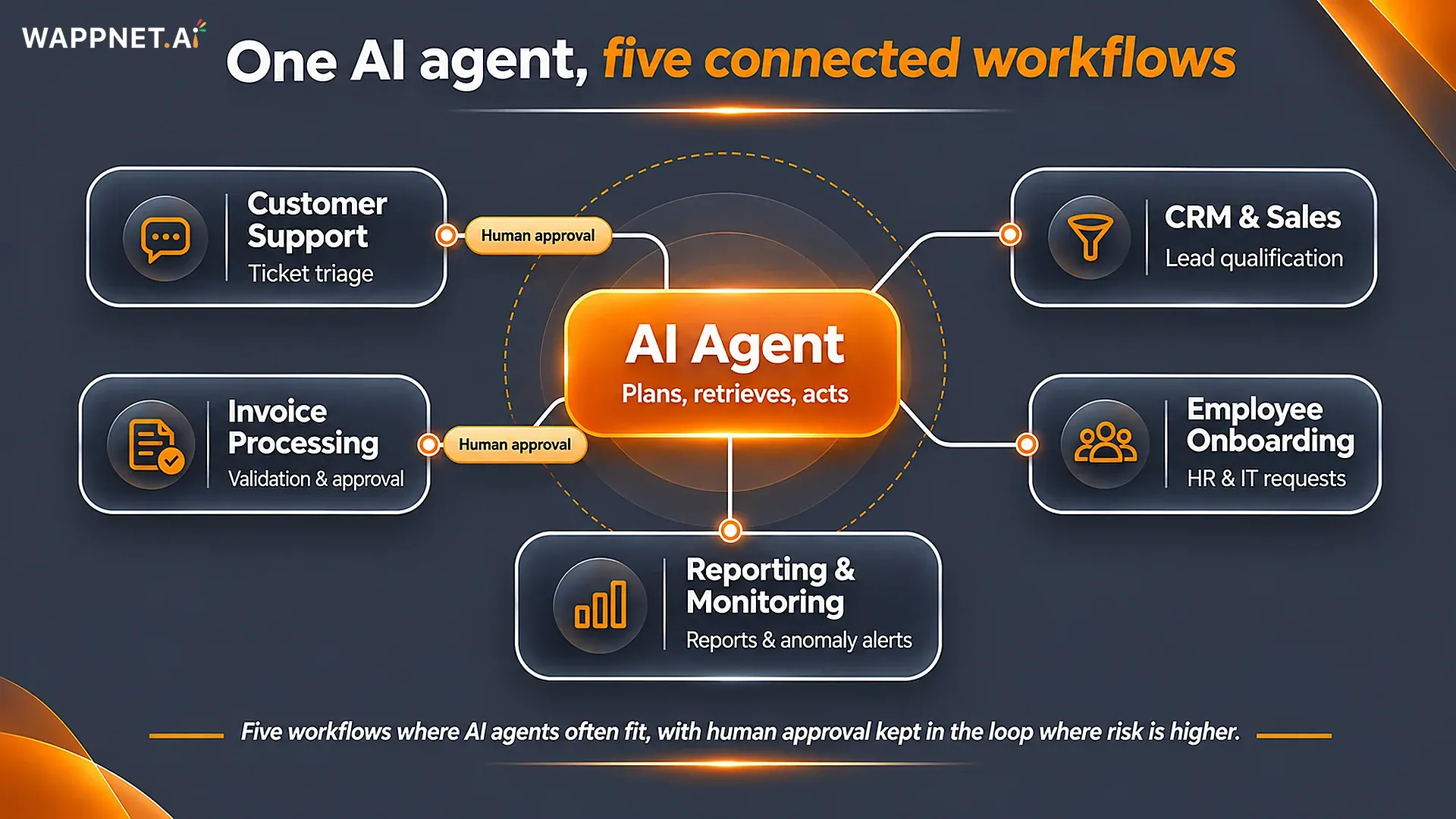
These five AI automation use cases combine volume, structured systems, and manageable risk.
1. Customer Support and Ticket Triage
Support teams lose time sorting tickets. An agent classifies each ticket, retrieves knowledge-base answers, drafts a reply, and routes exceptions to a person. Refunds and policy exceptions stay human-approved. Track first-response time.
2. Sales Lead Qualification and CRM Updates
Reps lose selling hours to data entry. An agent enriches new leads, scores them against your criteria, updates CRM records, and hands qualified prospects to sales with context. Measure qualified lead rate and speed to first contact.
3. Invoice and Document Processing
Finance teams re-key data and chase mismatches. An agent extracts fields, validates them against purchase orders, flags discrepancies, and sends clean items for approval. Payments above set thresholds still need human sign-off. Track processing time per invoice.
4. Employee Onboarding and Internal IT Requests
Onboarding spans HR, IT, and facilities, so tasks slip between teams. An agent coordinates account setup, equipment requests, and routine access tickets, escalating anything unusual. Multi-step flows like this may call for agentic AI development services. Track ticket resolution time.
5. Business Reporting and Operational Monitoring
Analysts spend days gathering numbers from separate tools. An agent pulls data, prepares recurring reports, and flags anomalies for review. It surfaces issues; people decide the response. Track report preparation time and anomaly detection lag.
How Do You Know Whether a Process Is Ready for AI Automation?
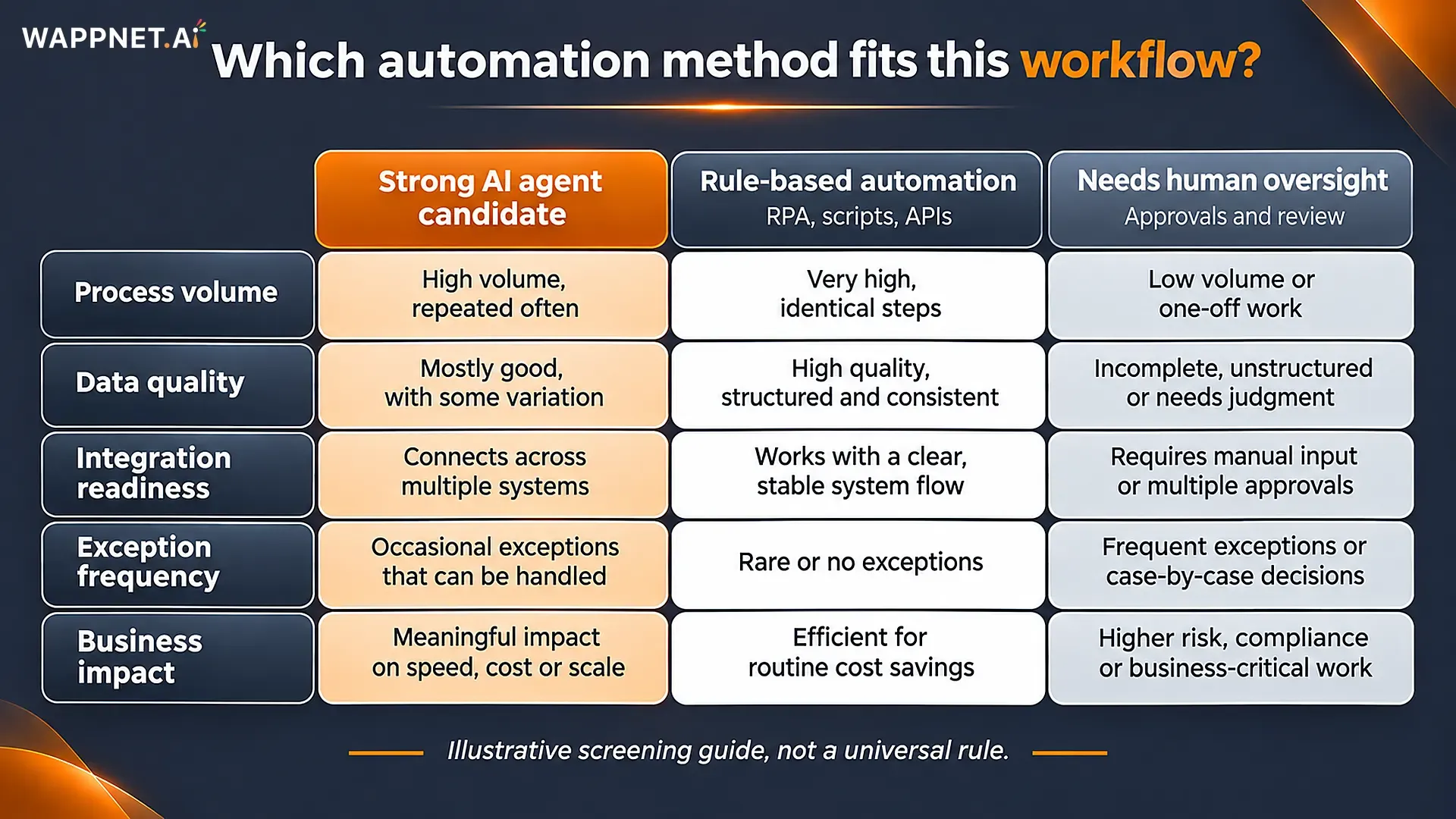
Repeatability alone does not justify an agent. If a fixed rule can make the decision, a script, API call, or RPA bot is cheaper and more predictable. Score each candidate on five factors:
- Volume and repetition: enough cases to justify build and upkeep.
- Data quality: accessible, current, consistent inputs.
- Integration readiness: working APIs for your CRM, ERP, and ticketing tools.
- Exceptions and judgment: some variation, but not constant.
- Business impact: a KPI you can baseline today.
Mapping these factors with an AI consulting and development partner before building AI workflow automation prevents costly false starts.
Business Process | AI Agent Suitability | Human Oversight | KPI |
|---|---|---|---|
Lead qualification | High for defined workflows | Review exceptions | Qualified lead rate |
Invoice validation | Conditional | Financial approvals | Processing time |
Support ticket routing | High for routine tickets | Complex cases | Resolution time |
Strategic financial decisions | Low for autonomous execution | Essential | Decision quality |
When Should You Avoid Using Autonomous AI Agents?
Sometimes an agent adds risk without adding value. Avoid full autonomy when:
- Decisions carry high financial or legal stakes, such as credit approvals.
- Data is incomplete, outdated, or scattered.
- The process is undefined or nobody owns it.
- Operations are sensitive and lack access controls, audit logs, or approval gates.
- The task is deterministic, so an API, script, or RPA bot is simpler.
The goal is the right automation method, not an agent in every workflow. Many strong intelligent business process automation designs use rules for execution and agents for interpretation.
How Can Businesses Measure ROI From AI Agents for Business Process Automation?
Baseline before you build. Track employee hours saved, processing cycle time, error and rework rates, and customer response time. Then count total ownership cost: integrations, monitoring, and ongoing maintenance, not just build fees.
ROI (%) = ((Financial Benefits − Total Costs) / Total Costs) × 100
Convert time savings using loaded labor cost, and exclude untraceable benefits. Run a limited pilot on one process first. It exposes real exception rates and costs before you scale. Our breakdown of AI automation pricing and ROI covers cost drivers.
How Can Wappnet.ai Help You Automate the Right Workflows?
Wappnet.ai can act as an engineering partner for enterprise AI agents, from selection through production. Through its AI agent and workflow automation services, teams can:
- Run workflow discovery and prioritization.
- Build custom AI agents for specific processes.
- Integrate with CRM, ERP, APIs, and internal systems.
- Add human approval controls where decisions carry risk.
- Monitor and tune agents after launch.
Each engagement should start with your workflow and constraints, not a preset solution.
Conclusion
Successful AI automation starts with choosing the right process, not the most advanced model. Pick one clearly defined workflow with a named owner, set a baseline KPI, and decide where humans stay in control. Then pilot, measure, and expand only what proves its value. That discipline turns AI agents for business process automation into a sound investment instead of another stalled experiment.
Frequently Asked Questions
Which business process is best to automate with AI agents first?
Start with a high-volume, low-risk workflow that has clean data and a measurable KPI, such as support ticket triage or lead qualification. Avoid high-stakes decisions at first. A contained pilot proves value before you scale.
Can AI agents integrate with existing CRM and ERP software?
Yes, usually through APIs, webhooks, or prebuilt connectors. Quality varies by system, so check API access, permissions, and data structure early. Legacy platforms without modern APIs may need middleware, which adds cost and extends timelines.
How are AI agents different from traditional workflow automation?
Traditional automation and RPA follow fixed rules and suit structured, predictable tasks. Agentic AI for business interprets unstructured input, chooses among tools, and handles variation within guardrails. Many production systems combine both approaches in one workflow.
How much does AI agent automation cost?
Cost of AI agent automation for business depends on scope, integrations, data readiness, model usage, and monitoring needs. A single-workflow pilot costs far less than an enterprise rollout. Request a scoped estimate after a workflow review.
Do AI agents still require human oversight?
Yes. Agents can make mistakes, so keep approvals for financial, legal, and sensitive actions and review exceptions regularly. Set confidence thresholds, audit logs, and escalation paths, then loosen oversight only as measured accuracy supports it.
Kishan Patel
Kishan Patel is the Co-Founder and CTO of Wappnet Systems with over 12 years of experience in technology leadership and product engineering. He leads the company’s engineering strategy, focusing on AI-driven applications, scalable architecture, and modern DevOps. Kishan has built and scaled high-performance platforms across healthcare, fintech, real estate, and retail, delivering secure and scalable solutions aligned with business growth.
Related Post
RAG vs Fine-Tuning vs Prompt Engineering: Which Approach Fits Your Use Case?
October 9, 2026
What is an AI Copilot? Use Cases & Build Guide
October 5, 2026
What Is RAG? A Complete Guide to Retrieval-Augmented Generation
September 28, 2026
LLM Development Services Cost Explained (2026 Pricing Guide)
September 24, 2026