
Workflow Automation Solutions
Workflow Automation connects the tasks, approvals, and systems your team coordinates by hand today into one defined, repeatable process. Our Workflow Automation Solutions help you map how work actually moves through your business, then automate the repetitive steps: routing tasks, moving data between applications, sending notifications, and queuing approvals, so people spend their time on the decisions that need judgment instead of the handoffs that don't.
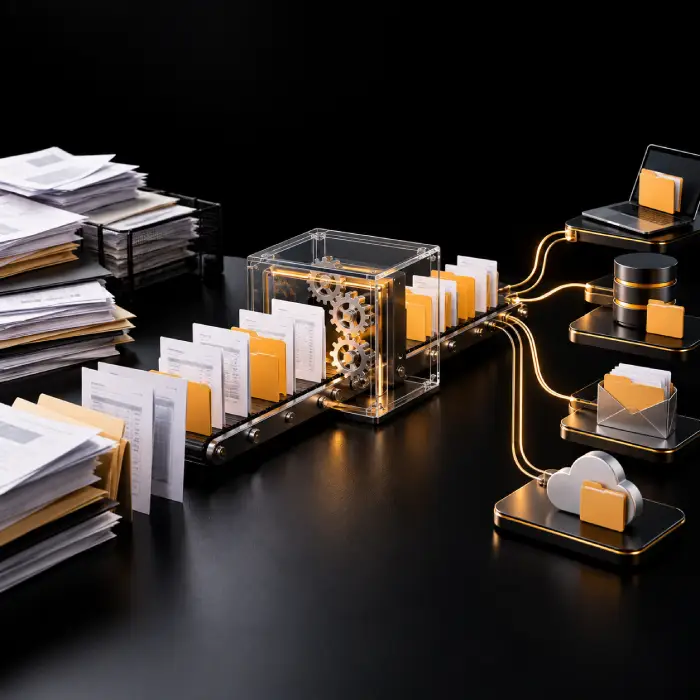
Why Businesses Invest in Workflow Automation
Coordination overhead tends to build up quietly as a business adds systems, teams, and process variations. Business Workflow Automation is usually explored once that overhead becomes visible. These are common challenges operations and business teams describe to us, not something every business necessarily experiences in full.
Repetitive Manual Tasks
The same data entry, status update, or follow-up step repeated dozens of times a week, by hand, the same way every time.
Copying Data Between Applications
Re-entering the same information into a CRM, a spreadsheet, and an accounting tool because the systems don't talk to each other. Manual Process Automation is usually the first thing teams look to fix here.
Processes Run Through Spreadsheets and Email
A process that technically works, but lives in someone's inbox and a shared spreadsheet rather than a system anyone else can see or rely on.
Delays Caused by Manual Approvals
A request sitting in someone's inbox for days, not because the decision is complicated, but because no one is tracking that it's waiting.
Repeated Data Entry Across Systems
The same customer, order, or employee record typed into multiple systems instead of entered once and shared.
Inconsistent Process Execution
The same type of request is handled in a different way depending on who picks it up, with no shared standard behind it.
Unclear Task Ownership and Status
Nobody is quite sure whose turn it is to act next, or whether a task was actually picked up at all.
Missed Follow-Ups and Handoffs
A request that quietly falls through the gap between two people or two teams, with no automatic reminder to catch it.
Limited Visibility Into Process Bottlenecks
No clear way to see where work is actually getting stuck, so the same delay keeps recurring without anyone able to point at the cause.
Operational Bottlenecks
One step in a process that consistently slows everything behind it, often because it depends on a single person or a manual check.
Exceptions That Require Staff Investigation
Edge cases that don't fit the normal pattern, and that someone has to stop and manually dig into every time one appears.
Difficulty Scaling Without More Admin Effort
Growth that brings more volume, but also more of the manual coordination work that was already stretched thin.

What Does Workflow Automation Include?
Workflow Orchestration coordinates a task from the moment it enters the process to the point it's resolved or approved. It handles the repeatable steps, including routing, data transfer, and notifications, while sending anything that needs judgment to the right person for review. What's active in your implementation depends on your systems, your rules, and your process.
- Workflow discovery and process mapping, followed by trigger-based automation that starts the workflow from an event, a form submission, or a schedule.
- Conditional business rules that decide what happens next based on the details of each case.
- Automated task routing and assignment to the right person, queue, or system.
- Approval Workflow Automation with defined approvers, escalation paths, and sign-off tracking.
- Automated notifications and reminders, plus data transfer between applications through API and system integration.
- Document or request intake with AI-powered workflow automation for classification where inputs vary, human-in-the-loop review, exception handling, and workflow status tracking.
Workflow Automation Solutions Built for Your Business
Every team deals with a different mix of tasks, approvals, and systems. Our Workflow Automation Services and broader Process Automation Solutions are grouped around the problems operations, finance, support, and sales teams most often bring to us.
Repetitive Task Automation
The same manual step, done the same way every time, is a strong candidate for automation. Automated Business Workflows handle the repeatable part of a process so staff only step in where judgment is needed, once the task pattern is clearly defined and repeatable.
Approval and Request Workflows
Requests that stall because no one is tracking whose turn it is to act. Approval Workflow Automation routes a request to the right approver, tracks sign-off, and escalates if it sits too long, based on a defined approval hierarchy and escalation rules.
Cross-Platform Data Synchronization
The same record is typed into multiple systems by hand. Cross-Platform Workflow Automation keeps records consistent across a CRM, an ERP, or a support system as information changes, wherever API or connector access to each system is available.
Automated Task Routing and Notifications
Work that sits unassigned until someone happens to notice it. Automated Task Routing assigns the right task to the right person or queue and sends a reminder when it's waiting too long, based on agreed routing rules and ownership.
Document and Form Processing Workflows
Intake forms and documents that need to be read, checked, and routed before work can start. These workflows move an incoming document through intake, validation, and routing to the right next step, once the document format and required fields are mapped.
AI-Assisted Request Classification
Incoming requests written in free text, with no consistent format to sort by. Intelligent Workflow Automation can read and classify the request so it reaches the right queue without someone reading every one manually, once configured and validated against representative examples.
Exception Handling and Follow-Up Workflows
Cases that don't fit the standard pattern and currently get lost. These workflows catch anything outside agreed exception rules, hold it in a visible queue, and escalate it rather than letting it stall silently.
Multi-Step Business Process Orchestration
A process that spans several teams and systems, with no single place to see its status. Business Process Workflow Automation coordinates every stage so the handoffs between teams happen on their own, wherever visibility and access across each system is in place.
Spend Less Time Managing Repetitive Business Tasks
Tell us about the processes your team manages manually today, the systems and applications involved, where approvals happen, and where handoffs tend to stall. We'll map what a workable automation setup looks like for your business.
Works With the Tools You Already Use
Reliable Workflow Integration gets tasks and records information into and out of the systems your teams already run, rather than operating as a disconnected side process.
Our Workflow Automation Process
A structured path from understanding your current process to a monitored, live workflow, delivered as part of our Workflow Automation Services.
- 1
Understand Current Processes & Objectives
We review how the process runs today, which systems and people it touches, and where the biggest bottlenecks and business objectives sit.
- 2
Map Tasks, Triggers & Decision Points
We document every task, trigger, system, handoff, and decision point in the process, including the exceptions that come up today.
- 3
Identify Automation Opportunities
We identify which parts of the process are well suited to rule-based automation, which may benefit from AI assistance, and which should stay manual for now.
- 4
Design Workflows, Rules & Exception Paths
We design the workflow logic, permissions, approval routing, and exception paths before any build work starts.
- 5
Build & Test With Real Users and Systems
We build the workflow and test it against real scenarios and the people who will actually use it, not synthetic examples alone.
- 6
Deploy, Monitor & Refine
We deploy with monitoring in place from day one, track exceptions, and refine the workflow based on operational feedback.
Workflow Automation: Use Cases
Where workflow automation fits into real operations, from everyday lead handling to cross-team service requests.
Lead Capture and CRM Updates
A new lead from a form or ad platform is logged, enriched, and assigned to a rep automatically, instead of waiting for someone to notice it.
Customer Support Ticket Routing
Incoming tickets are classified and routed to the right queue based on topic and urgency, so routine requests reach the right team faster.
Invoice and Document Workflow Coordination
An incoming invoice is captured, matched against a purchase order, and routed for approval instead of circulating by email.
Employee Onboarding Task Coordination
Onboarding tasks across HR, IT, and a hiring manager are triggered and tracked from one place as a new hire's start date approaches.
Purchase Request and Approval Workflows
A purchase request is routed to the right approver based on amount and department, with a visible status instead of an email thread.
Sales Handoff and Follow-Up Automation
A closed deal triggers the handoff to onboarding or delivery, with tasks and notifications sent automatically so nothing waits on a manual email.
Data Synchronization Across Applications
A record updated in one system, such as a CRM, is reflected in a connected billing or support system without manual re-entry.
Reporting and Notification Workflows
Status updates and operational reports are compiled and sent on a schedule, instead of someone assembling them manually each week.
Internal Service Request Management
IT, facilities, or HR requests are logged, routed to the right team, and tracked to resolution, with reminders for anything sitting too long.
AI-Assisted Document or Request Classification
Free-text requests or incoming documents are read and categorized so they reach the correct workflow without manual sorting.
Workflow Automation vs. RPA vs. AI: Which Approach Fits Your Process?
Manual workflows, rule-based Workflow Automation Software, robotic process automation, AI Workflow Automation, and broader workflow orchestration solve overlapping but different problems. Capability in each row depends on the specific platform and configuration, not the category alone.
| Factor | Manual Workflows | Rule-Based Workflow Automation | Robotic Process Automation | AI-Enabled Workflow Automation | Broader Workflow Orchestration |
|---|---|---|---|---|---|
Handling repetitive tasks | Yes, by staff | Yes, by configured rules | Yes, via UI-driven bots | Yes, plus variable-input handling | Yes, across multiple workflows |
Conditional logic | Yes, by staff judgment | Yes, built on business rules | Limited, scripted logic | Yes, rules plus AI-assisted decisions | Yes, coordinated across processes |
Cross-application integration | Manual re-entry | Yes, via APIs or connectors | Often via the UI layer | Yes, via APIs or connectors | Yes, typically central to the platform |
Working with structured data | Yes, by staff | Yes, this is a core strength | Yes, this is a core strength | Yes | Yes |
Interpreting unstructured inputs | Yes, by staff judgment | Not typically | Not typically | Yes, within configured scope | Depends on included AI capability |
Exception handling | Yes, by staff judgment | Rule-based, within configured scope | Depends on scripted exception paths | Rule-based with AI-assisted prioritization | Yes, typically included |
Human approval | Inherent to the process | Yes, configurable approval steps | Depends on the bot design | Built in for flagged or low-confidence cases | Yes, typically included |
Monitoring & traceability | Often informal or absent | Depends on the tool | Varies by vendor | Yes, when configured | Yes, usually central to the platform |
Suitability for variable processes | Yes, by staff judgment | Best for predictable, structured cases | Best for stable, UI-based tasks | Better suited to variable inputs | Yes, designed for complex, multi-path processes |
Industries We Help With Workflow Automation Solutions
Processes, systems, and approval requirements differ across industries, which is why Enterprise Workflow Automation is scoped per business rather than applied as a single template.
Healthcare Administration
Coordinating intake, scheduling, and referral tasks across departments, subject to applicable regulatory requirements.
Financial Services
Routing approvals and compliance checks across teams while keeping an auditable record of every step.
Retail & E-Commerce
Coordinating order, inventory, and fulfillment data across multiple sales channels and systems.
Manufacturing
Routing purchase, quality, and maintenance requests across production and procurement teams.
Logistics & Supply Chain
Coordinating shipment status, exception handling, and carrier communication across a multi-step process.
Professional Services
Routing client requests, engagement approvals, and billing tasks across project teams.
SaaS & Technology
Coordinating onboarding, support escalation, and internal request workflows as teams and tools scale.
Education
Routing admissions, enrollment, and internal administrative requests across departments.
Why Choose Wappnet AI as Your Workflow Automation Company?
As a Workflow Automation Company, we don't start from a fixed template. We begin with how your business actually coordinates work today, so the routing logic, approval rules, and exception handling we design reflect your systems and your process, not a generic preset.
- Design business-specific workflows around your actual tasks, not a generic automation preset.
- Scope integration works to the CRM, ERP, and other systems you already run.
- Select rule-based or AI-enabled approaches based on what the task actually needs, not by default.
- Build configurable routing, approval, and escalation logic that matches how your team works.
- Keep exception handling and human review in place wherever judgment matters.
- Refine workflows after launch as your processes, volume, and systems evolve.
Real-World Workflow Automation Solutions We've Delivered
A look at how enterprises streamline handoffs, eliminate repetitive admin tasks, and connect distributed business systems.
Automated Quote-to-Order Fulfillment Workflow
A manufacturing distributor automated quoting, ERP sales order creation, and inventory reservations, cutting turnaround from 4 days to 2 hours.
Multi-Department Employee Lifecycle Orchestration
A technology firm automated cross-department tasks across HRIS, IT identity provisioning, and payroll, eliminating manual handoff delays.
Claims Intake & Document Routing Automation
An insurance administrator deployed an automated intake and validation workflow that triages claims, checks missing fields, and assigns reviewers.
Ready to Simplify Your Business Workflows?
We can help assess your manual tasks, approval delays, integration needs, and automation opportunities, and tell you honestly where rule-based automation fits and where AI adds real value.
Latest AI Insights & Industry Trends
 RAG
RAG vs Fine-Tuning vs Prompt Engineering: Which Approach Fits Your Use Case?
Compare RAG, fine-tuning, and prompt engineering to explore costs, use cases, and the best approach for enterprise AI.
 AI Copilot
What is an AI Copilot? Use Cases & Build Guide
What is an AI Copilot? Learn how it works, how it differs from AI agents, key use cases, and how to build one for your business.
 RAG
What Is RAG? A Complete Guide to Retrieval-Augmented Generation
Learn what RAG is, how Retrieval-Augmented Generation works, reduces AI hallucinations, and powers smarter enterprise AI.
Frequently Asked Questions
Workflow Automation is the automation of a defined sequence of tasks, actions, decisions, or handoffs according to business rules and workflow requirements. It replaces manual coordination, such as email follow-ups or spreadsheet tracking, with a configured sequence of steps.
A workflow starts with a trigger, such as a new form submission or a status change. From there, configured business rules decide what happens next: a task is assigned, data moves between systems, a notification goes out, or the item is routed for approval. Exceptions and unclear cases route to a person.
Workflow automation automates one defined sequence of tasks. Business Process Automation is the broader approach, often covering multiple workflows, systems, and teams across an entire operational process. A workflow is usually one part of a larger business process.
AI Workflow Automation incorporates AI for tasks such as interpreting unstructured inputs, classifying requests, extracting information, or supporting routing decisions, used alongside, not instead of, configured business rules. It is most useful where inputs vary and don’t fit a fixed pattern.
Common candidates include repetitive data entry, approval routing, notifications and reminders, data transfer between systems, request intake, and status tracking. Suitability depends on how predictable and well-defined the task is, and on the systems involved.
Workflow Integration typically connects applications through APIs, webhooks, or custom connectors, so a trigger in one system can update records or start tasks in another. Feasibility depends on each system’s available interfaces, permissions, and data quality.
Robotic process automation uses software bots that perform predefined actions, often by interacting with a user interface the way a person would. Workflow automation coordinates tasks, data, and decisions across a process, and may or may not use RPA as one of its components.
AI tends to add value when a workflow involves unstructured or variable inputs that are hard to cover with fixed rules, such as interpreting free-text requests. For predictable, structured tasks, rule-based automation is often simpler to build, test, and maintain.
Yes. Approval steps are a standard part of workflow design. A workflow can route a request to one or more approvers, wait for a decision, and only proceed once the required sign-off is recorded.
Items that fall outside configured rules, fail validation, or fall below a confidence threshold are routed to an exception queue for human review rather than being forced through automatically. Exception handling and monitoring are part of designing a reliable workflow, not an afterthought.
In many cases, yes, where the existing software offers APIs, webhooks, or another supported integration method. We assess your specific systems during discovery rather than assuming every application supports every type of connection.
Workflow automation follows a defined sequence of steps. AI Agents can use models and available tools to carry out tasks through multiple steps and decisions, within their permissions and operating boundaries. An AI agent can be one component inside a larger workflow, rather than a replacement for one.
Cost and complexity depend on the number of systems involved, the availability of APIs or connectors, how much the process varies case to case, the volume of exceptions expected, and whether AI-assisted steps are part of the scope. We review this during discovery rather than quoting a fixed price upfront.
Start by describing your current process, the systems involved, where approvals happen, and where time is being lost. We review this with you, assess technical feasibility, and outline an appropriate scope before any implementation work begins.